For InterAction only, Vuture has the ability to download your InterAction suppression lists on a daily schedule and store the contacts locally.
This means that for each mailing, instead of loading all suppressed contacts from InterAction in real-time, Vuture can use the locally stored details. This significantly improves sending performance, particularly if you send multiple mailings each day.
Please note: Vuture uses the IA ContactId for unsubscribes/global suppressions.
To configure the schedule
Please contact Vuture Support or your Client Success Manager for assistance in configuring this feature.
Each InterAction instance can have its own download schedule. We recommend a minimum of one download per day, preferably out of core working hours, since the purpose is to reduce the load on your InterAction.
Note that it does not matter if someone happens to be sending while the download is happening since the locally held data is not updated until the download has fully completed.
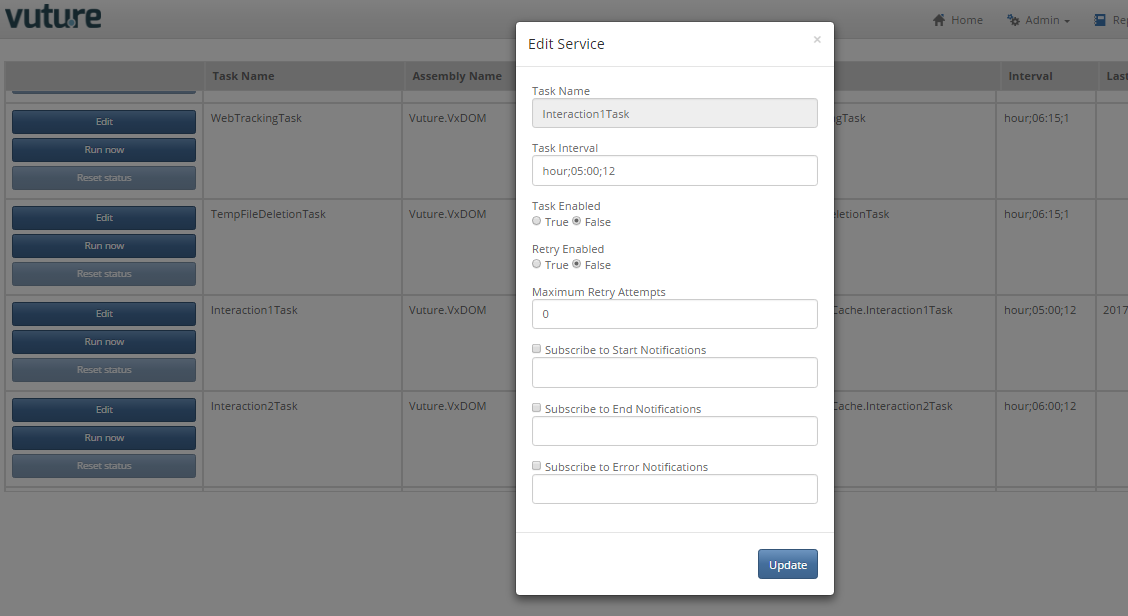
Go to Admin.Services and for each InterAction instance that is to be configured for a scheduled download, find the Task, click on Edit and set the schedule.
Note: The number 1 in the name Interaction1Task corresponds to the InterAction instance number for which it is being set up. If you only have one instance of InterAction integrated with Vuture, this number will always be 1.
In the example image below, the "Task Interval" of "hour;05:00;12" means that the download will happen every 12 hours starting at 5am (this means therefore 5am and 5pm each day).
Note that the time is in the local Vuture server time. Set "Task Enabled" To "True" and click "Update". You can check with your Client Success Manager if you are unsure which time zone your server is in.
Please also note the time above should be randomised rather than following the exact example above.
Local Vuture Server Times (which observe daylight savings) are:
US Data Centre: Central Time
UK Data Centre: UK Time
Canada Data Centre: Eastern Time
Hong Kong Data Centre: Hong Kong Time
To use the cached list
Once the suppression lists have been downloaded at least once, your Vuture Administrator will enable "AdminSystem.Configuration.Interaction.DownloadAndStoreUnsubscribeData" which will trigger the switch from downloading in real-time, to using the locally-cached data.
Technical information
When the cache task runs, we expand all suppression lists from the master configuration and the content-type dictionary. We download each folder individually to reduce the load on InterAction, and then recombine the contacts globally and by content-type. If any folders appear in more than one content-type then they will be de-duplicated and only downloaded once.
For example, if the system is configured with three global suppression folders and three content types, each with two folders, Vuture will download:
3× Global suppression +
2× Content type 1 +
2× Content type 2 +
2× Content type 3
= Nine total folders downloaded
= Combined into four ‘content types’.
The download is run in a transaction, which means if the download fails it will rollback to the previous set of contacts.
In order to receive notifications, you need to subscribe to updates for each task within “Admin.Services” by selecting “Edit” within a task and entering the email address to which the notifications of the selected subscription updates for each task should be sent to.
The address provided will get an email for each notification that it has been subscribed to, saying the name of the scheduled task, whether it is Start, End or Error and if Error what the Error message is.
