You can manage the URL that you use to access a website by clicking on "options" at the top of the left editing panel and selecting "Properties"
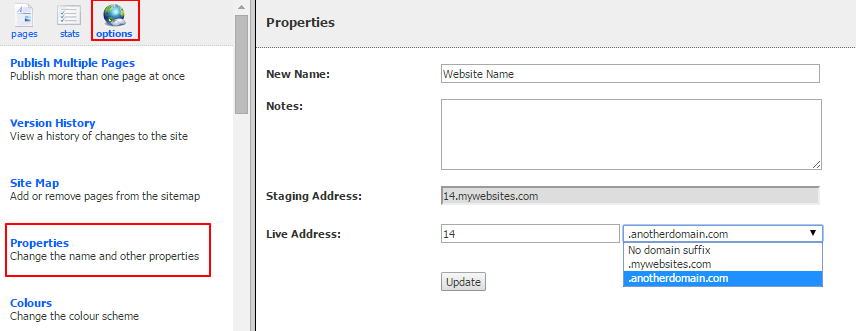
From here you will see two URLs for the site.
The "Staging Address" is a fixed system URL for accessing the site. This allows you to access the site while setting up a live URL or if there is an issue with the Live Address.
The "Live Address" is where you can define the URL you would like to use for the website. If you have set up subdomains for new website creation (in this example .mywebsites.com and .anotherdomain.com are available subdomains) then you can select the required domain suffix from the dropdown and enter the prefix. For example if you entered site1 then and picked .mywebsite.com from the dropdown then your URL will be site1.mywebsite.com
If you have set up a custom domain for this website then you can choose "No domain suffix" from the dropdown and enter the full domain e.g. www.mycustomdomain.com. Note that you must make sure the the A DNS record for the domain is pointing at the IP address of your Vuture system. Please contact Vuture Support for assistance with that. Note that if you need the site to run over HTTPS a new IP address will need to be provisioned for you.
Click "Update" to save your changes.
