In order to Access Event Module Badge Pages within an email campaign, you must enable the feature "Admin.Roles.Email Campaigns.View Event Badges" for the required roles.
We recommend only enabling this feature for roles that need to edit or view badge pages from the email campaign since badges can be generated from the Event App itself.
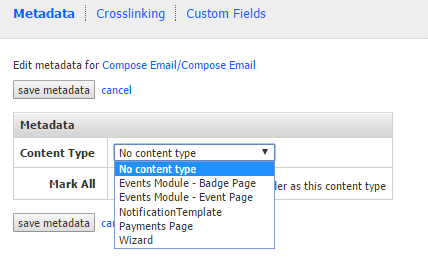
If an expected page is not visible in an email campaign make sure that the correct content type has been set under page or folder options. Pages marked as "Events Module - Badge Page" will only be visible if you have the feature above enabled. Pages marked as "Events Module - Event Page" are system pages corresponding to individual Events in the Events App and are only visible to Vuture staff.