This update applies to all versions of the Events App - v1, v2 and v3.
Vuture has updated the way to configure the Events App for logo, icon and background colour. These settings can now be accessed from the Campaign Summary screen, if the feature is enabled in Roles.
To see these settings in the Campaign Summary screen you need to check Admin.Roles.Email Campaigns.Event Branding.
Once enabled the Campaign Summary screen will have the additional settings as in the image below:
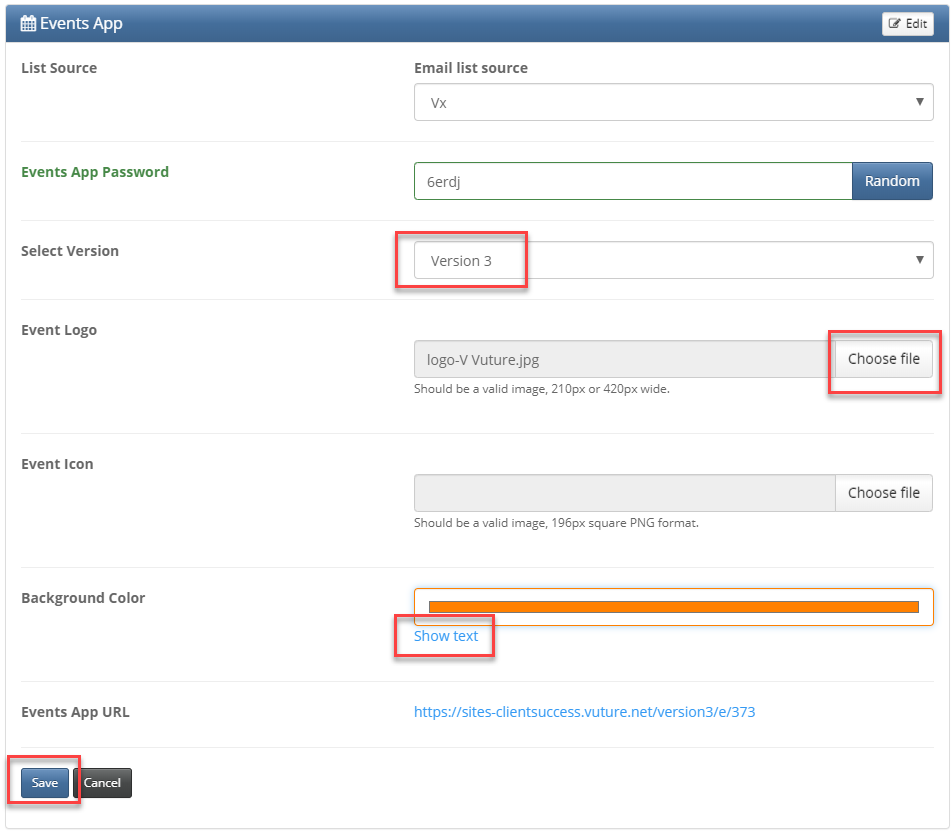
Note: image files need to be .png and no larger than 4MB.
Background colour can be selected via Show text - which will allow the hex settings or via Show picker - which will allow the colour picker.
The following options are available in "Admin.System.Events" to be customised as defaults for a Vuture instance.
- Events logo
- Events header background Valid CSS colour specification
- Events iOS icons
Once they have been configured in "Admin.System.Events", when an Events App is deployed it will inherit these settings as defaults.
These defaults can be overridden from within the campaign using "Options.Manage Event". update in 2019 - use Campaign Summary screen, as above.
