The Email Send Confirmation email is automatically sent to the user who creates the Send in Vuture.
It contains the following information:
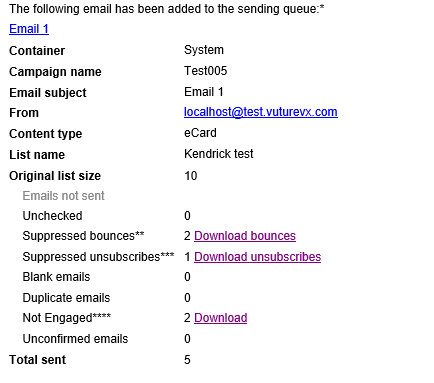
The three downloadable reports (Suppressed Bounces, Suppressed unsubscribes and Not Engaged) will now contain contact information as well as the email address. That is, First name, Last name, Title, Job Title, Company, ContactId (the ID will be the unique CRM-specific ID in each case).
If you have Not Engaged contacts in your mailing list, at the foot of this email there will be a sentence beginning with **** which will clarify whether or not these not engaged contacts are being suppressed, or only monitored. There is more on this here.
This will work for all CRMs.
Downloadable Reports
Download Bounces
This will download a list of all contacts who were suppressed on Send, due to hitting the consecutive bounce threshold. Any contacts who are not already marked as suppressed due to the bounce rule on send are not included in this list, and may go on to bounce for this mailing.
Download Unsubscribes
Unsubscribes are any contacts marked as such in the contact status field in Vuture, or who are marked as unsubscribed in CRM.
Download Suppressed
Suppressed contacts are those who have opted out of the particular email type set for your mailing. They may be subscribed to other topics.
Download Not engaged
This will give you a list of contacts who have been suppressed using the Email Whitelist tool. You can read more about this here.
Prerequisites:
Your Account Manager should:
- Enable 'Admin.System.Emails.Check Whitelist On Send'
- `Enable 'Admin.System.Emails.Log Suppressed Emails'
- Enable 'Admin.System.Emails.Suppressed Emails Log To Include Contact Info'
- Enable Interaction1 task (or whichever instance of InterAction is in use). Set it to run every 12 hours.

Note: Disabling config 3. above will exclude contact information columns and only show email address.
Note: For InterAction, the Title is picked from 'Salutation' field.
