Introduction
To remain compliant under GDPR (and other similar Data Protection laws globally) you will need to establish a legal basis for managing or “processing” the personally identifiable information (PII) of your contacts. “Processing” is a deliberately wide term which covers storing, managing and using their data. Their PII includes any piece of information which identifies the contact. Examples of PII would be First Name, Last Name, Company Name, Job Title and Email Address, but this is not an exhaustive list.
Special extra strict rules apply to certain, extra sensitive categories of data such as sexual preferences, religion, or membership of a political party, and some others. The ICO is the GDPR Regulator in the UK and their website carries full explanations and checklists for all aspects of remaining compliant with GDPR. Visit: https://ico.org.uk/
Your Firm, Your Contacts
GDPR varies in its approach depending on the type of contact you are working with. For this reason, it is very important, when starting to think about Data Protection, to take the following steps:
-
Gather your data into one place as far as possible. Take this opportunity to delete or archive any old lists; securely shred old printouts; issue an all-staff amnesty and request they offer up all “bottom drawer databases”, piles of old business cards and other collections of data they may have been harbouring. Old, out dated information will only serve to make your data management task much harder.
-
Segment your data into contact types. Some of your data will cover current clients. They can be handled in one way, while others will be intermediaries or referrers perhaps, or suppliers; they will be handled differently and finally you will have a list of prospects or targets.
-
Know where your data comes from. Did you pick up a business card at a conference? Did you buy in a list from a list broker? If you do not know the source of your data, you will find it more difficult to manage.
-
Know your legal basis: For each contact type, you will have to decide whether or not you need to obtain their consent to manage their data and their consent to send them marketing emails. You will have to store this consent, indicating exactly what they consented to and when. If you choose Legitimate Interest as your legal basis you will not have to ask your contacts for their consent to manage their data, but you will have to be able to demonstrate how you arrived at the Legitimate Interest decision, and you will still have to give them the option to Opt Out of receiving marketing emails from you.
-
Don’t forget the telephone. This article is mainly about email marketing, but the Telephone Preference Service (for private individuals) and the Corporate Telephone Preference Service (for people at work) exist to allow individuals to Opt Out of receiving sales and marketing calls. Your Sales Team should be checking the TPS or the CTPS as appropriate, before dialling.
DealCloud/Vuture Integration
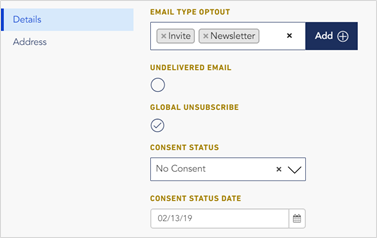
Certain contact Fields are Contact-specific additional information fields. When thinking about managing Consent, the DealCloud fields you will be working with are:
Global Unsubscribe
Consent Status
Consent Status Date
Email Type Opt Out
Global Unsubscribe allows your contacts to remove themselves from all mailings from you. Vuture will not send a mailing to anybody who has their email address in the Global Unsubscribe list, even if they appear in other lists too. The Global Unsubscribe list overrides them all.
Consent Status is a pick list and it can typically have the following values:
Expressed Consent
Implied Consent
No Consent
Unknown
Consent Status Date is a date field and is important because GDPR, while it does not give an expiry period for consent, does say that consent should be “up to date”. A similar law in Canada (CASL) specifies two years for consent to be considered as current.
Email Type Opt Out allows your contacts to remove themselves from all mailings of a “type”. Typically, Vuture clients will begin by having two types – Invitations and Newsletters – but you can have more types if you want to be more specific. These email types can be set up in DealCloud by adding a new email list type under DealCloud -> Lists -> Email List Types, and then configuring the field in Vuture’s metadata manager tool in the suppression settings panel. This part will be done for you by the Vuture team.
When you come to send an email, Vuture will ask you which Type of email you are sending, at the point of Send. Any contact who has unsubscribed from that email type will not receive the email.
Offering your clients a choice
To allow your clients and contacts to give their mailing preferences, you can add fields to a Vuture form:
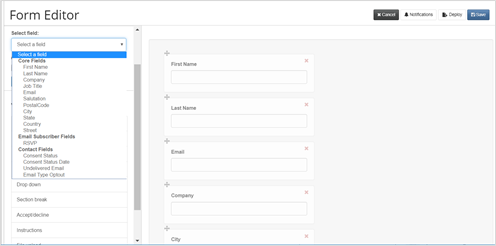
Selecting Email Type Optout from the list above and clicking on Add will give you the opportunity to add the following:
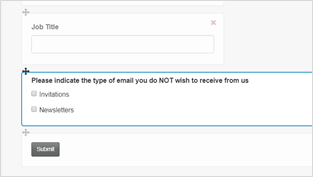
The wording is up to you, and it can be different on different forms.
Talk to your Project Manager or Account Manager if you have any questions.
